
AI PPC management covers the recurring work around paid advertising: account planning, task delegation, access, reporting, and responsibility for changes. This guide is for agencies, consultants, and in-house teams deciding how to organize that work across Google Ads and Meta Ads.
The starting question is which work should the platform, the assistant, and the account manager own? An agency needs a repeatable service process as well as campaign expertise. A faster report is useful only when the team can verify it and the client knows what was actually done.
For campaign-level instructions, use seven ways AI can optimize Google Ads PPC. For measuring improvement across Google and Meta, use the AI ads optimization measurement and testing guide. The AI Google Ads management overview compares Google's automation layers.
What is AI PPC management?
AI PPC management is the use of artificial intelligence to assist with planning, analyzing, operating, and optimizing paid advertising campaigns. It can combine native ad-platform automation, AI-assisted analysis, and connected tools that support specific account operations.
These capabilities do different jobs.
Google Smart Bidding optimizes bids for conversions or conversion value at auction time. An assistant analyzing a campaign export instead helps answer questions about the data you supplied. A connector such as LoomaScale connects an assistant with Google Ads or Meta Ads for reporting and supported account operations.
Those are complementary capabilities, not interchangeable products.
A practical operating model is to let the ad platform handle its configured delivery optimization, use an assistant to help investigate results, and keep a named person responsible for objectives and account changes.
Automating a task does not remove the need to define what a good outcome looks like.
How is AI used in a PPC team's workflow?
AI can assist with bidding, creative drafts, analysis, and reporting. The management task is to assign each capability a clear responsibility and a reviewable output. Google's Smart Bidding handles auction-time bid decisions; an account manager still defines the business objective and reviews the measurement setup.
| Recurring work | Role for AI or automation | Team responsibility | Deliverable |
|---|---|---|---|
| Campaign delivery | Native platform optimization within configured settings | Choose goals and budgets | Record of the approved configuration |
| Account analysis | Summarize reports and flag questions | Verify data and prioritize investigations | Evidence-backed review queue |
| Creative production | Draft variations from an approved brief | Check claims and brand fit | Reviewed creative candidates |
| Budget oversight | Calculate pacing with explicit assumptions | Reconcile client limits and exceptions | Pacing report with an owner |
| Client reporting | Draft an update from verified findings | Confirm what was proposed and what was done | Client-ready account update |
Build a client brief that survives handoffs
Keep the account identifier, reporting currency, business goal, conversion definitions, budget agreement, approved claims, and known data gaps in one brief. Name the person who maintains it. Update the brief when the client changes an offer or how leads qualify; otherwise the next analysis can reuse an obsolete objective.
Keep client contexts separate. A useful instruction for one account can be wrong for another, even when both sell similar products. Record where sales outcomes come from instead of assuming the advertising report includes them.
Separate the proposal, decision, and completed work
Use three explicit states in your task record: proposed, approved, and completed. Attach the supporting evidence and an owner to each recommendation. Confirm the actual account result before marking work complete. A report saying a campaign should pause is not evidence that it was paused.
Define permissions and escalation rules during onboarding. Review who can retrieve data and who can make changes, including any limits the integration enforces. A sentence in a prompt does not replace the account's access controls.
Set a review cadence and measure the service
Choose a cadence around the client's needs: pacing checks, an account review, and a client update may run on different schedules. Every review should end with a named owner and a next action or an explicit decision to wait.
Evaluate the operating process using total preparation and verification time, corrections needed, and whether agreed deliverables arrived on time. Evaluate campaign outcomes separately. To judge CPA or ROAS changes, follow the measurement and experiment workflow.
What is an AI PPC agency?
An AI PPC agency is a paid advertising service provider that incorporates AI into campaign management, analysis, creative production, or reporting. Here, the term describes an operating approach, not a promise of fully autonomous campaigns or better results.
For agencies adopting that approach, the useful opportunity is to make recurring work more consistent.
Start with a repeatable client brief. Record the business objective, approved budget, conversion definitions, known measurement limitations, and account-specific restrictions. Use that brief when requesting an analysis instead of expecting the assistant to infer the client's commercial context.
Next, standardize the review output. Ask for the same evidence fields across clients: the issue, affected spend, supporting metrics, uncertainty, recommended action, and person responsible for the decision.
Finally, establish how recommendations become changes. A report, a proposed adjustment, and an executed adjustment should be clearly distinguishable.
Do not make "we use AI" the whole agency proposition. Explain what the client receives: a consistent review process, understandable reporting, documented recommendations, and accountability for decisions.
Evaluate that process using time spent, including verification, alongside the business outcomes the client hired you to improve.
How should an agency introduce AI into its workflow?
Start with one recurring client task, name the person responsible for its output, and define how that output will be checked. Record the inputs, expected deliverable, approval step, and fallback when the data is incomplete. Use the same process for the next client only after verifying that their goals and account permissions fit.
For a product shortlist by job, read the best AI tools for PPC marketing in 2026. Once you have chosen a tool, answer three implementation questions before adding it to client work:
Does it have the necessary data? Decide whether a supplied export is sufficient or whether the workflow needs connected account retrieval. Require the tool to identify missing information rather than silently fill the gaps.
Can you distinguish analysis from execution? Understand which requests retrieve information and which can change campaigns. A "do not make changes" instruction defines the requested task; it is not the same as a technically enforced read-only permission.
Does the access model fit your client responsibilities? Verify which teammates can view or change each client's accounts. Do not assume that a tool's workspace permissions automatically mirror the permissions configured in the advertising platform.
A sensible evaluation is to run one defined task on one authorized account, check the output against the source data, and measure the total effort required.
If you are selecting software for a large organization, compare AI PPC tools for enterprises for procurement, integration, and governance requirements. This guide focuses on the recurring service process after tool selection.
How to start using AI PPC management with LoomaScale
LoomaScale connects Google Ads, Meta Ads and LinkedIn Ads with ChatGPT or Claude for account reporting and supported campaign operations, including spend, pacing, and results. It also reads Google Analytics 4 and Google Search Console, so a client review can include on-site outcomes and organic search alongside paid results. The documentation lists what the connection can and cannot do.
Start with one client account and a report-only request. Make the account, time period, metrics, and boundaries explicit.
For [client name and account ID], review the last 30 complete days compared with the previous 30 days. State the date ranges, account currency, conversion metrics used, and any data limitations. Show spend, conversions, and cost per conversion. Include conversion value and ROAS only where meaningful data is available. Identify the three most important issues to investigate. Show the supporting metrics, distinguish facts from hypotheses, and recommend the next check for each issue. Do not make any changes.
This screenshot shows the review prompt above run in ChatGPT on one of our own Google Ads accounts. It illustrates an account-review output to verify before preparing a client update: dated comparison periods, currency, time zone, and a clearly stated measurement gap. The visible excerpt reports spend up 151.7% and no recorded conversions in either period, and advises checking tracking and traffic quality before increasing the budget.
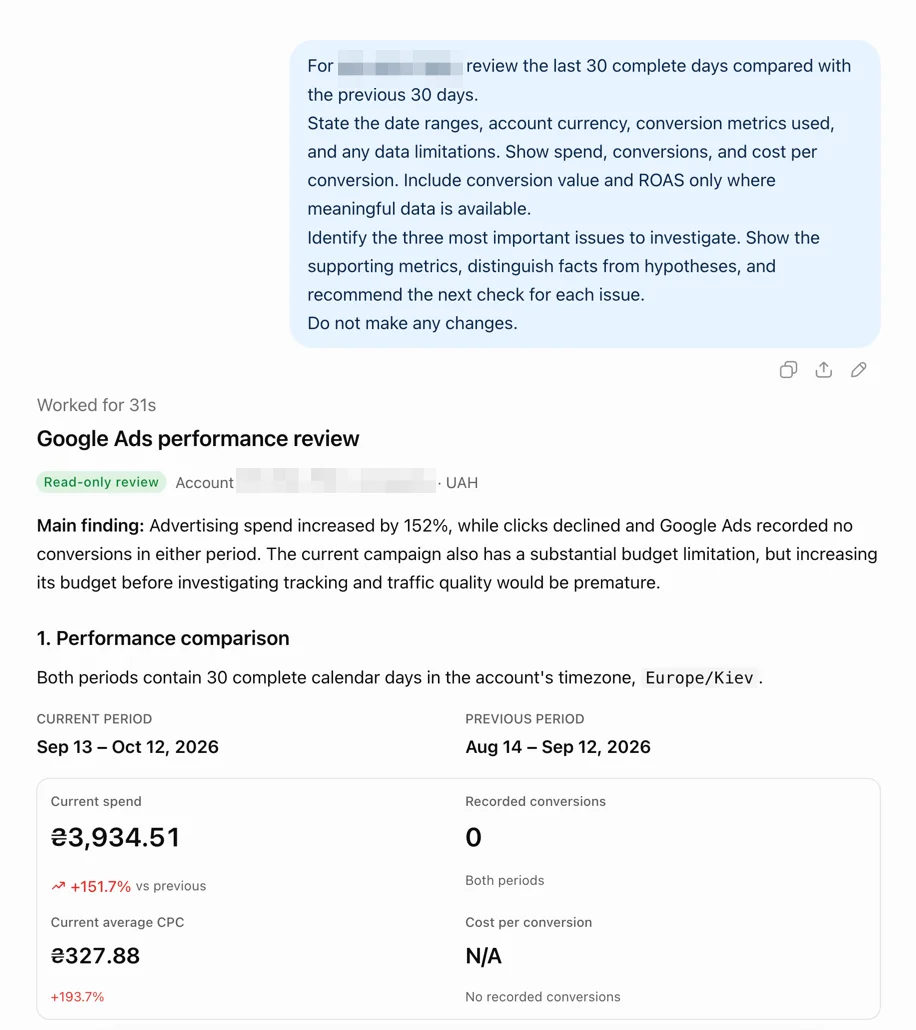
Review the findings before requesting an action. Check that the analysis used the intended conversion metric, compared appropriate periods, and did not describe unverified explanations as facts.
For a shared view across clients, use the multi-account Google Ads review workflow to compare the roster and choose which accounts need investigation first. Keep this agency process for briefs, responsibilities, and client reporting.
For a new Meta Ads client, use the Facebook and Instagram ads audit with ChatGPT to establish a baseline and agree on priorities before starting the recurring review process.
Once the review produces useful findings, use the verified analysis as the basis for a client update. Keep recommendations clearly labeled until you have confirmed what was actually implemented.
Setup takes a few minutes: connect ChatGPT to Google Ads, Claude to Google Ads, or ChatGPT to Meta Ads.
Start by reviewing a client account with LoomaScale, not by automating every decision.
The goal is better decisions, not more automation
AI PPC management should make it easier to move from account data to an informed decision.
For agencies and consultants, that means setting clear objectives, supplying the right context, checking the evidence, and keeping responsibility for changes explicit.
Use AI PPC tools to support a repeatable process: review the account, investigate the issue, decide what to change, and evaluate the result.
With LoomaScale, the starting point is a question about a connected Google Ads or Meta Ads account in ChatGPT or Claude. Choose one client, request a report, and judge the workflow by the usefulness of the findings.